How Much Every Single Row Counts
The IBM 3270 screen has been 24 rows by 80 columns since 1971. A conversation about why that never changed – and what four stolen rows taught us.
This blog post started as a conversation.
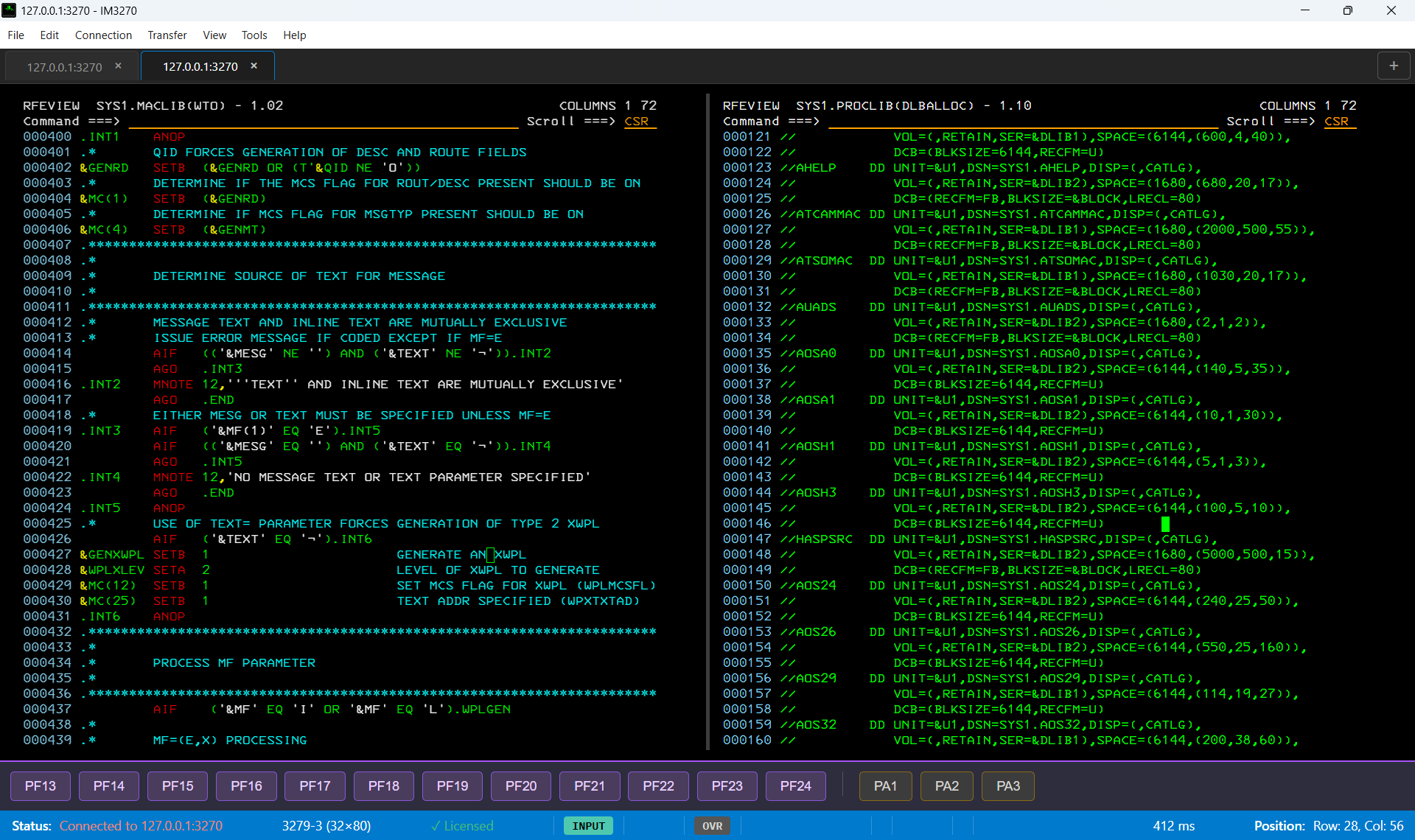
I was working on IM3270 – my 3270 terminal emulator – and I had just fixed a bug that restored four rows to the display. I was showing the result.
Every row earned.
That’s the whole post right there.
[Jim turns slowly to camera]
“Four rows.”
[long pause]
“He’s been talking about four rows for twenty minutes.”
[beat]
“I counted. It was twenty-three minutes.”
[turns back to monitor]
24 Rows. 80 Columns. Since 1971.
The IBM 3270 terminal was introduced in 1971. It displayed 24 rows of 80 characters each. 1,920 characters. That was the screen.
It never changed.
Not because IBM forgot to update it. Not because nobody asked. Because the entire mainframe ecosystem – ISPF, SDSF, JES, CICS, every panel, every menu, every data display – was built around those 24 rows and 80 columns.
The screen became a contract.
If you changed the dimensions, everything broke. If you added a scrollbar, you lost a column. If you added a toolbar, you lost a row. So nobody changed anything. The screen stayed at 24×80 and the world adapted to it.
Five decades of adaptation.
DEREK: “What is this?! A screen for ants?!”
“How can we be expected to debug when the terminal can only be this small?!”
“The rows need to be at least – three times bigger than this!”
HANSEL: “…It’s 24 rows, Derek. It’s always been 24 rows.”
DEREK: [nodding slowly, modelling the screen]
“…Really, really ridiculously small rows.”
What 24 Rows Actually Means
To a modern developer, 24 rows sounds like a footnote. Their IDE has hundreds of rows. Their terminal window is resizable. They scroll without thinking.
To a mainframe developer, 24 rows is the whole world.
Consider an ISPF Primary Menu: it takes 6 rows for the header and option list. That leaves 18 rows for content. If you’re looking at a dataset list, 18 rows means 18 datasets visible at once. If you need a 19th, you scroll.
Consider SDSF – the job monitor. Header takes 4 rows. Column titles take 1. That leaves 19 jobs visible. If you’re debugging a production issue at 3 AM with 30 jobs abended, you are scrolling through them 19 at a time.
Four extra rows means four more jobs visible without scrolling. At 3 AM, that matters.
3 AM. Production is down. Homer sits at the mainframe terminal.
He scrolls through the job queue. The abend message slides past.
Homer: “D’oh.”
[scrolls back]
[scrolls past it again]
Homer: “D’oh.”
[squints at screen]
Homer: “Why is this thing so… small?”
The screen has 23 rows. The bug is in row 24.
The Art of the 3270 Panel
ISPF panel designers were artists working in a constrained medium.
Every panel had to fit in 24×80. Every field had to be positioned by row and column. Every label had to earn its space. There were no pop-ups, no tooltips, no hover states. There was a screen, a cursor, and 1,920 characters.
The result was extraordinary discipline.
ISPF panels are models of information density. Every row carries meaning. Every column is accounted for. The layout tells you something – which fields are related, which values are important, which options are available – without a single pixel of visual design language.
You learned to read a panel the way you learn to read a page. Once you knew the grammar, you were fast. Faster than any GUI equivalent. Because your hands never left the keyboard and your eyes never left the data.
Four Rows (and the Bug That Stole Them)
Here is a confession: I knew about this bug for weeks. Every time I opened IM3270 and saw those empty rows at the bottom I thought – I’ll fix it tomorrow. Tomorrow became next week. Next week became “after the release.” The bug sat there quietly stealing rows while I worked on features nobody would notice as much as four visible rows.
Those four rows weren’t a new feature. They were stolen rows. A bug in IM3270 was rendering 23 rows instead of 24, and the remaining row sat empty at the bottom of the screen – wasted, silent, accusing.
When the bug was fixed, four rows came back.
That’s when I understood the weight of a single row.
This is actually well-known territory on mainframe. The number of visible rows isn’t just a window setting – it requires agreement on both ends. VTAM must have the terminal model defined in its Logon Mode Table (LOGMODE), and the emulator must declare itself as that model when connecting. Both sides have to support it – VTAM without the LOGMODE entry won’t allow it, and an emulator that doesn’t declare the right capability won’t get it. The models:
  Model 2 – 24×80   (the standard)
  Model 3 – 32×80
  Model 4 – 43×80   (comes with a pair of glasses)
  Model 5 – 27×132
Model 4 at 43×80 is for those who can see beyond the standard. Nineteen more rows than Model 2 – enough to change what you see at a glance. And yes – that is exactly why IM3270 has zoom in, zoom out, and a magnifier. More rows means smaller characters. The rows are worth it. The magnifier makes them readable.
Experienced administrators choose their model carefully. In a production incident, 19 extra rows might be the difference between seeing the problem immediately and scrolling to find it at 3 AM.
IM3270 respects this – you choose your terminal model, you get the rows you negotiated. No padding. No wasted space. Every row available, every row used.
The Constraint Was the Feature
Modern development environments give you infinite space. Infinite columns, infinite rows, infinite windows. Tabs, splits, panels, terminals nested inside terminals.
The result is not clarity. The result is noise.
The 3270 constraint forced clarity. You couldn’t show everything, so you showed what mattered. You couldn’t waste space, so nothing was wasted. You couldn’t add another panel, so the one panel you had was exactly right.
The systems that run on 3270 terminals process $10 trillion in transactions every day. They were designed in an era when every row cost money and every column was a decision.
That discipline is still there. In the panels. In the data. In the way mainframe developers think about information.
Four rows doesn’t sound like much.
Until you’ve worked in 24.
Every Row Earned
IM3270 is a modern 3270 terminal emulator for Linux and Windows.
It displays 24 rows by default – because that’s the contract.
But if your window is taller, it uses the space. Every row available. Every row earned.
Because on a mainframe, every single row counts.
FABIENNE: “Whose rows are these?”
BUTCH: “They were the 3270 terminal’s rows.”
FABIENNE: “Whose terminal is this?”
BUTCH: “Some bug took them.”
FABIENNE: “Who’s the bug?”
[starts the chopper]
BUTCH: “The bug’s fixed, baby.”
BUTCH: “The bug’s fixed.”
Also in Tools & Development: When AI Writes the Code