Bringing IBM Mainframe Languages to the Zed Editor
JCL, COBOL, REXX, and HLASM – syntax highlighting, snippets, and tree-sitter grammars for the fastest editor on the market.
For decades, mainframe developers have lived inside ISPF and 3270 terminals. The tools were purpose-built, the colors familiar, the muscle memory deep. But as more development moves to modern editors with rich tooling, mainframe developers have been left behind – forced to choose between the comfort of legacy tools and the productivity of modern ones.
Today, we are closing that gap. We are proud to announce imZEDe (Infomanta Mainframe Extension for Zed Editor), the first comprehensive mainframe language extension for Zed, the high-performance code editor built in Rust.
Why Zed?
Zed is fast. Really fast. Built in Rust by the team behind Atom, it offers the responsiveness mainframe developers expect from a green-screen terminal – with the modern features they have been missing: multi-cursor editing, fuzzy file search, integrated AI assistance, and a clean distraction-free interface.
But until now, opening a .cbl or .jcl file in Zed gave you nothing but plain text. No syntax highlighting, no snippets, no understanding of the language structure. imZEDe changes that.
JCL – Job Control Language
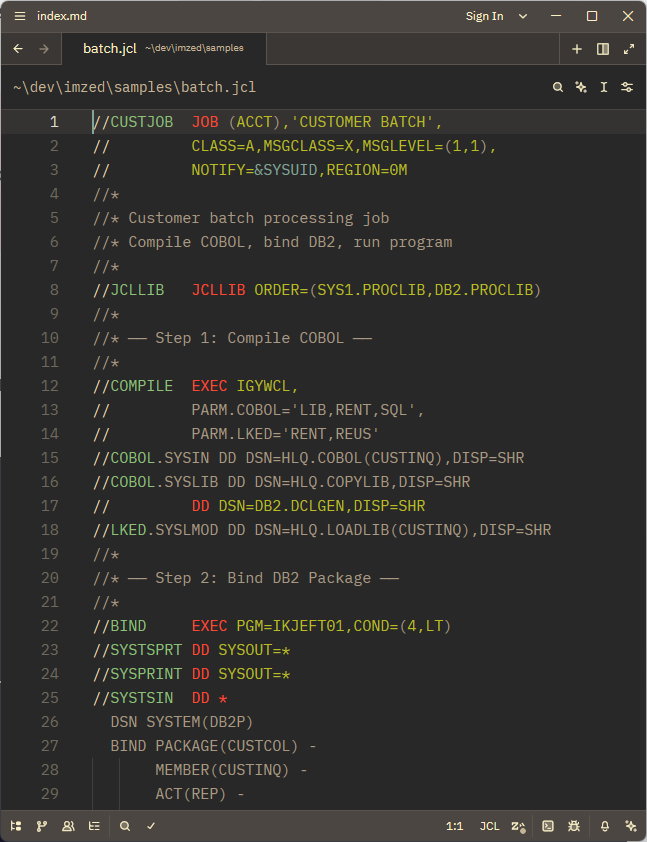
The scripting language for batch jobs on z/OS. imZEDe recognises .jcl, .prc, .proc, and .cntl files, with full highlighting for JOB, EXEC, and DD statements, conditional execution (IF/THEN/ELSE), inline procedures, and JES control statements.
Eighteen snippets cover the patterns you write every day – IDCAMS utility steps, IEBGENER copies, SORT operations, and more.
COBOL – IBM Enterprise with DB2 and CICS
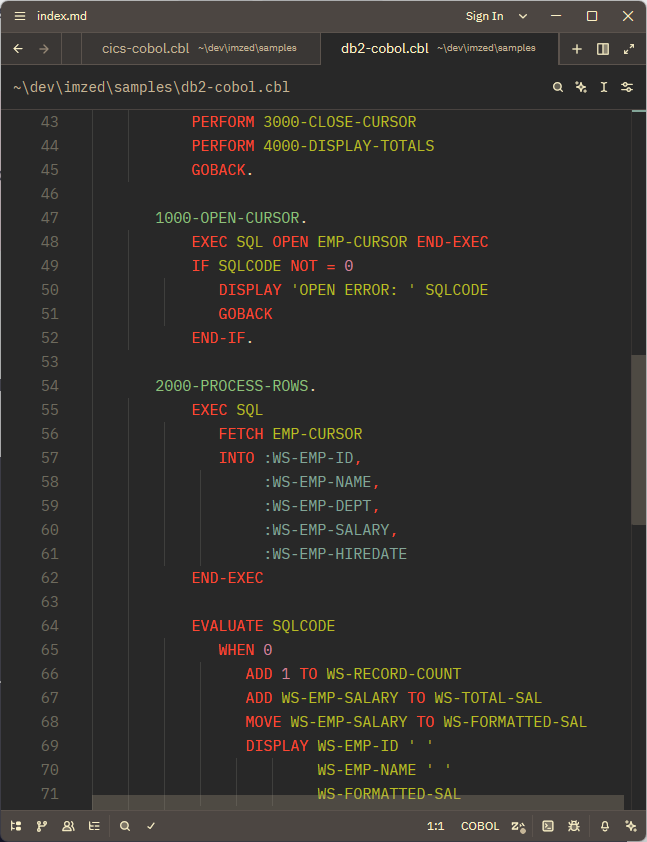
This is where we went deep. imZEDe supports IBM Enterprise COBOL with full highlighting across all four divisions – IDENTIFICATION, ENVIRONMENT, DATA, and PROCEDURE. Both fixed-format and free-format COBOL are supported. Copybooks, level numbers, PICTURE clauses, OCCURS tables, and condition names are all recognised correctly.
The real differentiator is EXEC SQL and EXEC CICS support. We built language injection for embedded DB2 SQL and CICS commands, with 274 keywords highlighted accurately inside EXEC blocks.
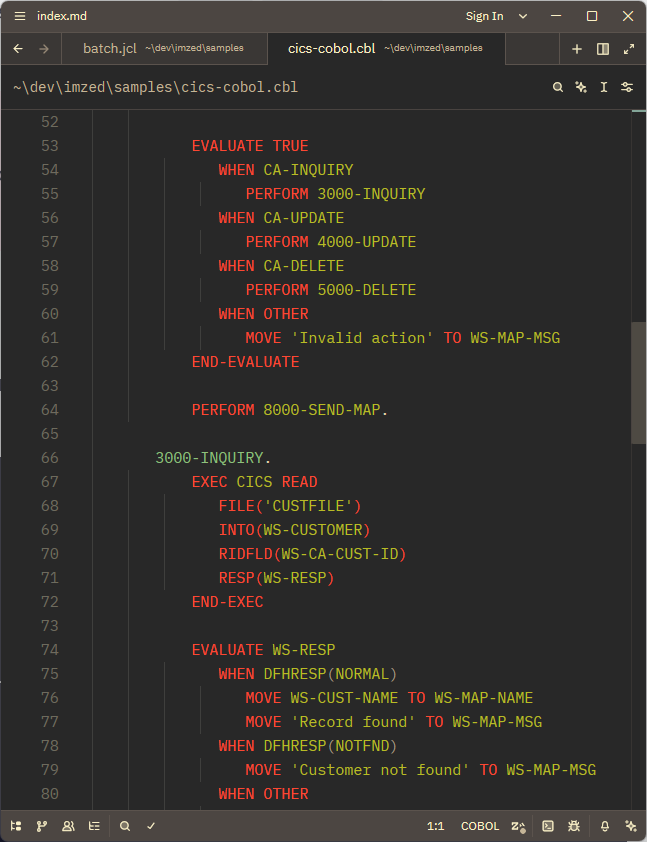
Twenty-nine snippets cover everything from program skeletons to cursor loops to CICS map handling.
REXX – TSO/ISPF
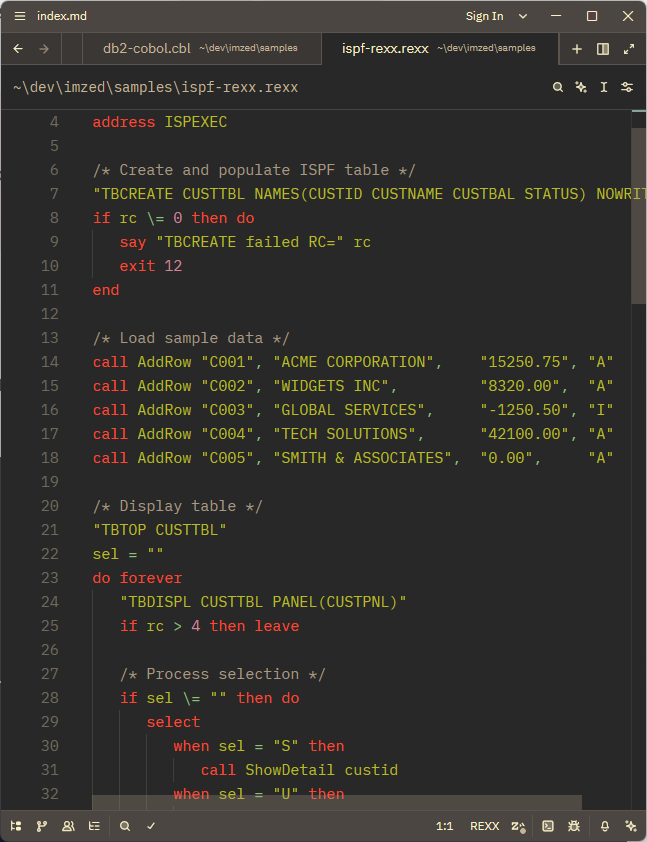
The scripting language that powers TSO and ISPF panels. imZEDe handles .rexx, .rex, .rx, and .exec files with proper block comment support – including the nested comments that REXX allows – keyword highlighting, function call recognition, and special variable support.
Twenty-two snippets cover loops, conditionals, ISPF service calls, and EXECIO patterns.
HLASM – High Level Assembler
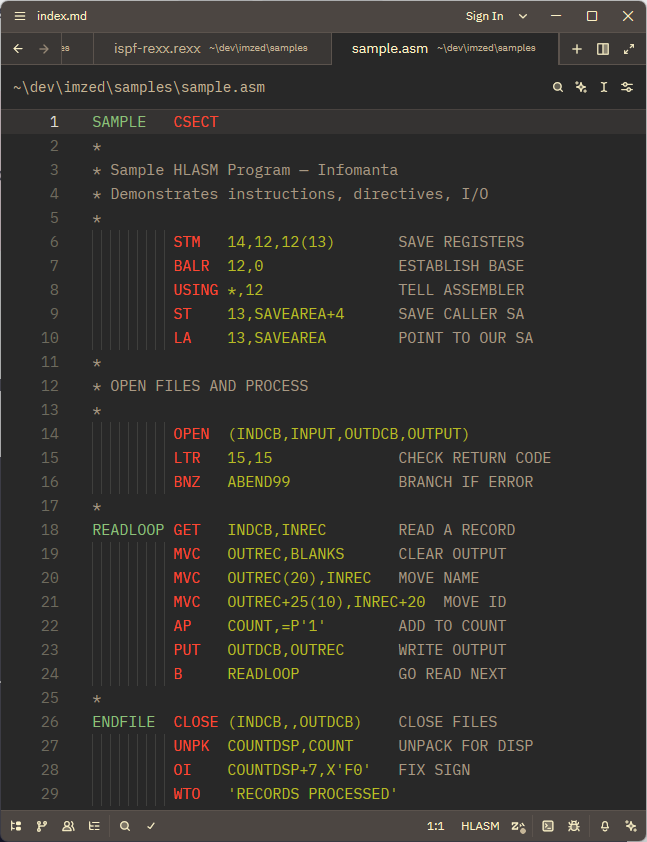
The macro assembler for z/Architecture. imZEDe handles HLASM's strict column-based syntax – labels in column 1, instructions, operands, comments – with a column-aware tree-sitter scanner.
Thirty-two snippets cover CSECT and DSECT structures, base register management, file I/O, branch instructions, and system calls.
ISPF colors, by design
We made a deliberate choice with the color scheme. Rather than using a generic syntax highlighting palette, we adopted the ISPF color scheme that mainframe developers have been seeing for forty years:
- Blue labels and names
- White keywords and operations
- Green operands and parameters
- Yellow strings and PICTURE clauses
- Red symbolic variables and special registers
- Cyan comments
Built on tree-sitter
Most editor extensions use TextMate grammars – regular expression patterns that approximate language structure. They are easy to write but they break on edge cases.
imZEDe uses tree-sitter instead. Each of the four languages has a dedicated tree-sitter grammar, parsing source code into a real abstract syntax tree. This means accurate highlighting that does not get confused by edge cases, support for language injection (SQL inside COBOL), and a foundation for future features like code outline navigation, refactoring, and intelligent autocomplete.
We forked, fixed, and in some cases wrote these grammars from scratch:
- tree-sitter-cobol – forked and extended for IBM Enterprise dialect.
- tree-sitter-rexx – written from scratch, including an external scanner for nested block comments.
- tree-sitter-ibmhlasm – forked from MITRE's open source grammar, with WASM compatibility fixes.
- tree-sitter-jcl – extended fork with additional statement types.
All grammars are open source and available on GitHub.
Install in one click
imZEDe is open source, MIT licensed, and available now.
2. Press Ctrl+Shift+X
3. Search for imzed
4. Click Install
Then in Zed: Extensions → Install Dev Extension → point to the cloned directory.
Currently pending review for the official Zed extension registry. Once approved, it will be installable directly from within Zed for every user worldwide.
What's next
Version 0.3.8 is a solid foundation, but only the beginning. On the roadmap:
- Code outline support for navigating large COBOL programs and JCL members.
- Format-on-save for JCL and COBOL.
- Linting for common mainframe coding mistakes.
- Snippet expansion based on community feedback.
- DB2 SQL as a standalone language for
.sqlfiles. - Macro library support for HLASM.
Contributions are welcome. If you are a mainframe developer who has been waiting for this, please give it a try, file issues, suggest snippets, and share with your team.
Mainframe developers should not have to choose between familiar tools and modern ones. imZEDe brings JCL, COBOL, REXX, and HLASM into a fast, modern editor – with the colors and structure you already know.
Free. Open source. MIT licensed. Try it, fork it, or send a pull request.
Also worth reading: Starting Mainframe Work at a Bank: First 90 Days · AI Writes the Code. Who Talks to the Machine?