IMTerm Feature Reference
Complete feature documentation for v2.0 — AS/400, z/OS, VT, and beyond
Terminal Emulation
Three protocols. Pure Go. No plugins, no Java, no ActiveX.
TN5250E — AS/400 / IBM i
Pure Go client • RFC 1205 / RFC 2877
- Pure Go implementation — no C, no cgo; cross-compiles to Windows and macOS
- Screen sizes 24×80 and 27×132; auto-detected via SNA bind negotiation
- CP424 (Hebrew New) CCSID with auto-detection via NEW-ENVIRON negotiation
- TLS on port 992 with host certificate validation and TOFU mode
- Full AID key set: F1–F24, Attn, SysRq, Clear, Roll Up/Down, Field Exit
- Failover hosts: configure primary + backup AS/400 address per connection profile
- Automatic failover on disconnect with user notification banner
- CCSID override per connection profile for non-auto-detect hosts
TN3270E — z/OS Mainframe
tn3270go pure Go library + s3270 fallback
- tn3270go pure Go library (production-ready); s3270 subprocess for full ISPF compatibility
- All terminal models 2–5: 24×80, 32×80, 43×80, 27×132
- Erase Write Alternate (EWA) dynamic resize; extended field attributes; 16 colors
- IND$FILE upload and download; EBCDIC codepages CP037, CP500, CP1047, CP424
- DBCS/SBCS mixed-mode fields; structured fields; query reply
VT52–VT525 / xterm
xterm.js rendering • SSH + Telnet transport
- Full DEC VT family: VT52, VT100, VT102, VT220, VT320, VT420, VT520, VT525
- SSH v2 via golang.org/x/crypto/ssh — password and public-key authentication
- Telnet raw and NVT modes; SCO-ANSI and Linux console emulation
- Hebrew BiDi via VTBiDiAddon — Unicode TR#9 preprocessing on every screen row
- Full VT220 control sequences: SGR, cursor addressing, DEC private modes, charset G0/G1
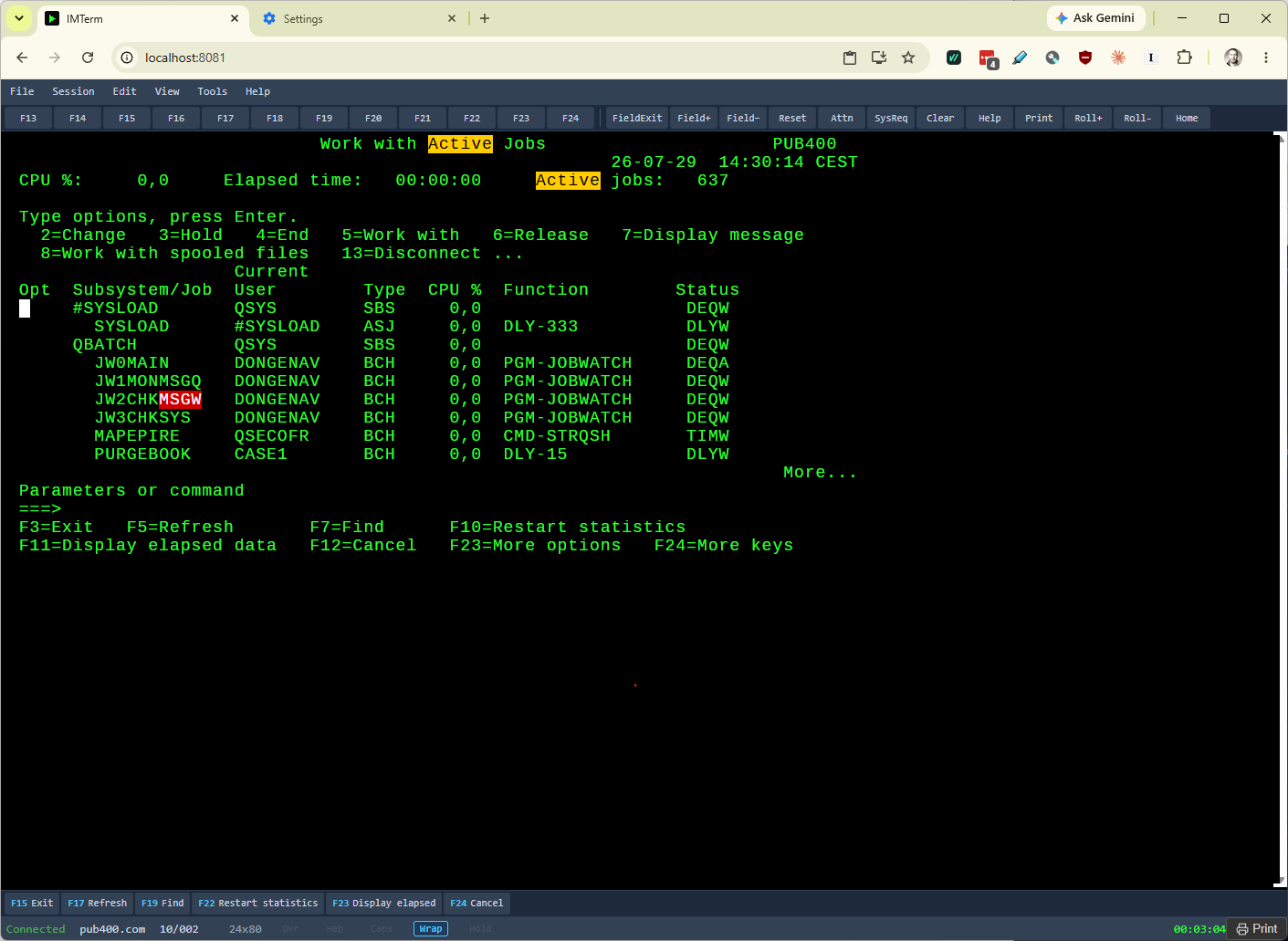
Auto-highlight rules on a live IBM i session - MSGW in red, Active in yellow
Screen Modernization
Transform any green screen into a modern web form. No host changes. No middleware.
Screen-to-HTML Engine
- Auto-detects titles, labels, input fields, subfiles, and function-key bars on any 5250 or 3270 screen
- Generates semantic HTML form with properly labelled inputs
- Edits in the HTML form sync bidirectionally to the live terminal session
- No host application changes required; works with all existing programs
GET /screen/htmlreturns visual HTML snapshot;GET /screen/formreturns JSON field data
Custom Template System
- Define polished two-column or multi-section layouts for important screens
- Templates matched by screen title pattern (regex or exact string)
- Built-in Customer Maintenance template included and documented
- Template editor uses CodeMirror with HTML syntax highlighting and live preview
- Templates stored in config directory and shared across all users
Dual View Sync
- Split panel: live xterm.js terminal on the left, rendered HTML form on the right
- Any keystroke or field edit in either view reflects immediately in the other
- Toggle split view per session with toolbar button or keyboard shortcut
- PF key bar captured and rendered as clickable HTML buttons in modern view
- Subfiles rendered as HTML tables
HLLAPI REST API
- Screen content, field values, and cursor position accessible over HTTP
- Stateless endpoints authenticate with Bearer token
- Integrate from any language: Python, PHP, Node.js, curl
- Used by Agent Mode, scheduled scripts, and external RPA tools
- Documented in OpenAPI 3.0.3 at
/api/v2/docs/openapi.yaml
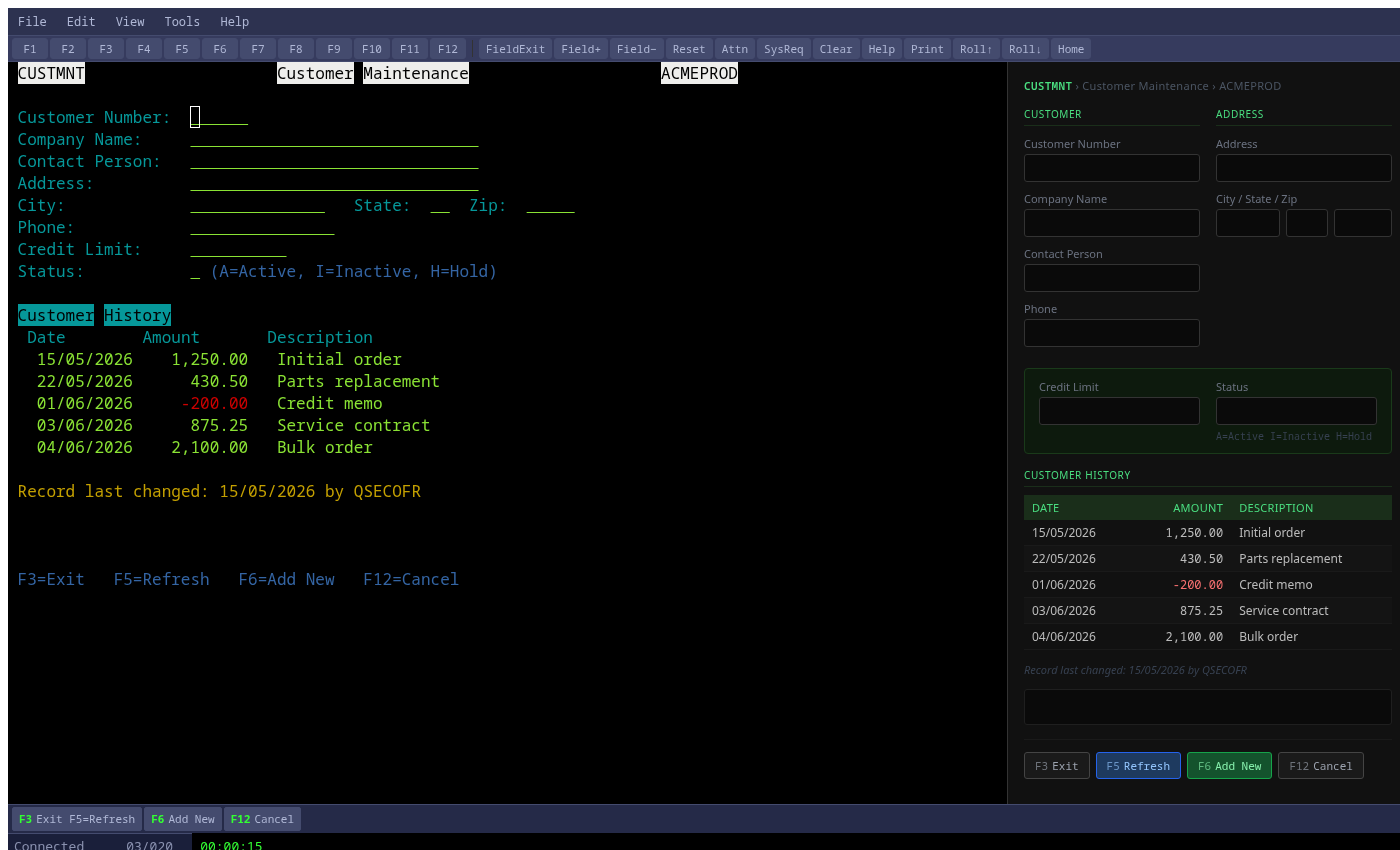
Split view — live terminal and modern form simultaneously
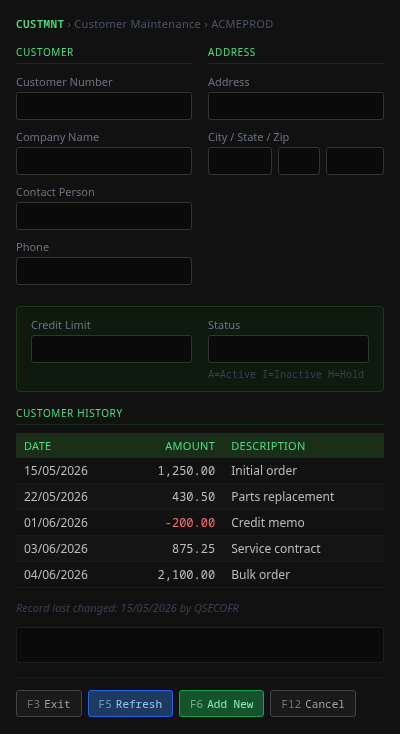
Custom template with two-column layout
AI and Automation
Natural language control, JavaScript scripting, scheduled jobs, event triggers.
Agent Mode UNIQUE
- Natural language instructions: "Sign on and show me the top 10 active jobs"
- Five providers: Anthropic Claude, OpenAI GPT, Google Gemini, Ollama (local/offline), Mock (no API key required)
- Protocol-aware tool sets: 5250 menu navigation and CL commands; 3270 ISPF and dataset tools; VT shell
- AI reads screens, navigates menus, fills fields, submits forms, and reports results
- Save AI-generated action sequences as reusable JavaScript scripts
JavaScript Scripting
- CodeMirror editor with JS syntax highlighting, autocompletion, and error markers
- Session API:
type(),sendKey(),waitForScreen(),readField(),getScreen() - Scripts share the live session; no separate host connection needed
- Built-in script templates for common workflows: signon, job query, file transfer
- Run interactively or schedule; output streamed to script console pane
Scheduled Scripts
- Cron-expression scheduling (minute, hourly, daily, weekly)
- Manage schedules from the web UI at Settings > Scheduler
- Schedule state persisted as JSON in the data directory; survives restarts
- Per-schedule enable/disable toggle without deleting the definition
- Execution log with timestamps and script output retained per run
Event-Driven Scripts
- Five event types: screen-change, field-value, session-connect, session-disconnect, error
- Regex pattern matching on screen text to fire the event handler
- Rate limiting prevents runaway loops on high-frequency screen transitions
- Used for auto-reply to confirmation prompts, data extraction triggers, and alerts
- Combine with scheduled scripts for full unattended workflow automation
PSL Migration Tool
psl2jsCLI converts PowerTerm Script Language files to IMTerm JavaScript- Web-based import wizard at Settings > Import Profiles
- Handles PSL macro commands, send-key sequences, and wait statements
- Translation endpoint at
/api/v2/psl2jsfor programmatic use - Review and edit converted scripts in the built-in CodeMirror editor before running
RPA and HLLAPI Bridge
Existing RPA scripts work without modification. Modern REST API for new automations.
HLLAPI Bridge DLL
- Native HLLAPI bridge DLL compatible with UiPath, QTP/UFT, and Blue Prism
- Standard HLLAPI function numbers 1-90 supported
- Existing RPA scripts connect to IMTerm sessions without code changes
- Tested with common AS/400 automation patterns: data entry, inquiry, report extraction
- Bridge routes HLLAPI calls to the live IMTerm session via WebSocket
Macro Recorder
- Record keystrokes and screen navigations from the toolbar
- Save macros with a name; assign to keyboard shortcut or Power Pad button
- Replay single or looped; adjustable playback speed
- Exported macros are JavaScript - edit in the script editor for advanced logic
- PowerTerm .pts session files import as connection profiles
REST API for Modern Automations
- OpenAPI 3.0 spec at /api/docs with interactive Swagger UI
- Webhook delivery for session-connect, session-disconnect, and security events
- Read screen content, set field values, and send AID keys over REST
- Bearer token auth; rate limiting configurable per token
- Agent Mode for AI-driven automation using natural language instructions
Enterprise Printing
Full AS/400 host print pipeline. SCS-to-PDF. Hebrew. CUPS/LPR. Compliance archive.
TN5250E Host Printer Sessions
- Dedicated TN5250E printer sessions using device type IBM-3812-1
- Receive SCS (SNA Character Stream) print data directly from the AS/400 spool
- No PC-attached printer or external print server software required
- Multiple simultaneous printer sessions; each mapped to a physical or virtual printer
- Session auto-reconnects on network interruption; print job queue preserved
SCS Data Stream Parser
- Complete SNA Character Stream (SCS) parser written in pure Go
- Handles SCS control codes: NL, FF, CR, LF, RFF, RNL, SHF, SVF, SCGL, SGNL
- Page geometry, line spacing, and font switching preserved in output
- SCS transparency blocks (TRN) passed through for mixed SCS/PCL data
- No dependency on IBM Host Print Transform for PDF generation
SCS-to-PDF (Pure Go)
- Server-side PDF generation in pure Go — no GhostScript or external tools
- Supported paper sizes: A4, A3, Letter, Legal
- ANSI highlight colors reproduced in PDF output
- Print preview in browser tab before routing to physical printer
- MultiSheet: multi-page SCS jobs produce a single multi-page PDF
Hebrew CP424 Printing
- Full CP424 EBCDIC-to-UTF-8 translation in the SCS pipeline
- Hebrew text rendered right-to-left in PDF output
- Mixed Hebrew/English (BiDi) documents handled via Unicode TR#9
- Print output matches host intent exactly — no character substitution
- Tested with common AS/400 Hebrew financial and ERP applications
CUPS and LPR Routing
- Route print jobs to CUPS queues on Linux via
lp - LPR/LPD protocol support for network printers and Windows shared printers
- Windows clients receive PDF for local download instead of CUPS routing
- Per-printer-session routing config: CUPS queue, LPR host:port, or PDF download
- No client-side print agent or browser plugin required
Print Archive Pro
- All print jobs automatically archived to a searchable compliance store
- Configurable retention: default 7 years; meets SOX, GDPR, HIPAA requirements
- Search by date range, user, session, printer queue, or content keywords
- Download any historical job as PDF directly from the admin console
- Archive stored as flat files; no separate database process required
Spool File Viewer
- Browse IBM i spool files directly in the browser via FTP to QSYS.LIB/QSPL.LIB
- Download spool file, parse SCS, and render as PDF in a new browser tab
- No WRKSPLF screen navigation required; works from a toolbar button
- Supports *SCS, *USERASCII, and Host Print Transform output types
- Filter by user, output queue, or date in the file browser panel
Security and SSO
Enterprise authentication, RBAC, FIPS 140-2, full audit log. No phone-home.
Authentication Methods
- Local accounts (bcrypt)
- LDAP / Active Directory
- Azure AD / Entra ID (OIDC)
- OIDC (Okta, Google Workspace, and any compliant IdP)
- SAML 2.0 (ADFS, PingFederate)
- Kerberos SPNEGO (keytab, gokrb5)
- mTLS client certificates
Role-Based Access Control
| Capability | Admin | User | View-Only |
|---|---|---|---|
| Connect terminal sessions | Yes | Yes | Yes (read) |
| Send keystrokes, submit forms | Yes | Yes | No |
| Run scripts and Agent Mode | Yes | Yes | No |
| Manage own connection profiles | Yes | Yes | No |
| Manage all users and profiles | Yes | No | No |
| Access audit log and admin console | Yes | No | No |
| View print archive | Yes | Own jobs | No |
TLS and Security Headers
- TLS 1.2 minimum; TLS 1.3 preferred; configurable cipher suites
- HSTS with configurable max-age; sent on all HTTPS responses
- Content Security Policy (CSP) — strict; inline scripts use nonces
- X-Frame-Options: DENY; X-Content-Type-Options: nosniff
- WebSocket origin validation; rejects cross-origin WS upgrade requests
FIPS 140-2
- FIPS build uses Go BoringCrypto, certificate #3678
- Build with
make build-fips; producesbin/imterm-fips - AES-GCM, RSA-OAEP, ECDSA P-256/P-384 — only FIPS-approved algorithms
- All session keys, TLS handshake, and password hashing use approved primitives
- FIPS mode verified at startup; process exits if BoringCrypto is not active
Audit Log
- 96 structured IMTE message IDs covering all security-relevant events
- JSON format, one record per line; SIEM-compatible (Splunk, Elastic, QRadar)
- Events: login, logout, failed auth, session open/close, key send, file transfer, print, config change
- Log rotation configurable by size and time; compressed archives retained
- Audit log access restricted to Admin role; append-only file
LDAP / Active Directory
- Full Active Directory integration via LDAP bind authentication
- Group-to-role mapping: AD groups automatically assign Admin, User, or View-Only role
- Periodic group sync: role assignments stay current without manual intervention
- Mixed mode: LDAP primary with local account fallback for service accounts
- Kerberos SSO: transparent browser login on Windows domain machines via SPNEGO
Azure AD / Entra ID (OIDC)
- OpenID Connect redirect flow for Entra ID / Azure AD
- Tenant and client configured via imterm-setup Phase 6
- Group-to-role mapping from Azure AD group membership claims
- Mixed mode: OIDC primary with local admin fallback
- "Sign in with Microsoft" button on the login page
Privacy and Licensing
- No phone-home: zero telemetry, no external DNS lookups at runtime
- Offline license: key validated locally; no license server process required
- License file is a signed JWT verified against the Infomanta public key
- Seat count enforced locally; aggregate counting in Redis cluster mode
- Runs in air-gapped environments with no internet access
Enterprise Scale
Horizontal scaling, Redis cluster, session affinity, and license aggregation.
Multi-Server Deployment
- Run multiple IMTerm instances behind nginx or any HTTP/WS reverse proxy
- nginx
ip_hashor sticky-cookie for WebSocket session affinity - Shared NFS data directory: users, profiles, audit logs, and seat counts shared across all nodes
- No separate database or coordination process required
GET /healthhealth check endpoint integrates with load balancers and orchestrators- Built-in load test tool (imterm-loadtest) with P50/P95/P99 reporting for SOW compliance
Redis Cluster
- Optional Redis integration using a built-in RESP protocol client (no external driver)
- Distributed seat counting: heartbeat keys with TTL; automatic expiry on node failure
- Aggregate active session count visible at
/api/stats - Redis Sentinel and Redis Cluster topologies both supported
- Falls back to NFS-based counting if Redis is unreachable
Session Affinity and Licensing
- WebSocket sessions are sticky to the node that accepted the upgrade
- Reconnect logic retries same node first, then any healthy node
- License seat count aggregated across all nodes via Redis or shared NFS
- Per-node seat limit optional; cluster-wide limit enforced globally
- License expiry and seat exhaustion produce IMTE audit events; no silent drops
imterm-setup Enterprise Installer
- Interactive TUI wizard guides through TLS, auth, LDAP, cluster, and SIEM configuration
- Session migration from PowerTerm .pts files (Phase 8.5) - import existing profiles in bulk
- Automated SOW security compliance checklist: TLS, auth mode, admin presence, audit log (Phase 13.1)
- Automated performance baseline via imterm-loadtest: P50/P95/P99 latency report (Phase 13.2)
- Cluster resilience self-test: drain/undrain cycle confirms load-balancer failover (Phase 4)
- Headless --yes mode for CI/automation; --dry-run for preview without changes
Active-Active Cluster
Peer mesh architecture - every node is equal. No single point of failure. Zero-downtime upgrades.
Peer Mesh Architecture
- Every node is equal - no primary, no replica, no dedicated aggregator
- Admin console on any node shows all sessions and users across the full cluster
- Terminate any session from any node's admin console
- Cluster health visible at each node's /admin panel
- Node identity (node_id) stamped on every audit event for traceability
Graceful Drain and Rolling Upgrades
- Drain a node from the admin console - new sessions routed to other nodes
- Existing sessions remain on the drained node until they disconnect naturally
- Configurable drain timeout; forced disconnect after timeout if needed
- Rolling upgrade: drain, upgrade binary, restart, undrain - repeat per node
- Zero downtime for users during a rolling cluster upgrade
Stable Node Identity
- node_id persists across restarts - set in config.yaml or IMTERM_NODE_ID env var
- Consistent identity allows audit log correlation across cluster nodes
- Cluster peer list configured statically or via shared NFS discovery
- Each node tracks peer health via heartbeat; stale peers removed automatically
- Seat count aggregated across all live nodes
- Resilience demonstration script for SOW Section 6 compliance reporting
Capacity-aware health endpoint
Set max_sessions: 500 in config.yaml. When a node
reaches capacity, the health endpoint returns HTTP 503 - your load
balancer automatically stops routing new connections to that node.
No middleware, no custom scripts.
We are the only terminal emulator that does this.
Productivity
Hotspots, Power Pad, split screen, history, macros, keyboard mapping, and more.
Hotspots and Triggers
- Clickable screen regions: click a menu number to select it without typing
- URL hotspots: click any URL on the terminal to open it in the browser
- Pattern-based triggers auto-send keystrokes when matching text appears on screen
- Rate limiting on triggers: minimum interval between firings prevents runaway loops
- Configure hotspot regions and trigger patterns per connection profile
Power Pad
- Floating 4×6 button grid (24 buttons); toggle with View > Power Pad
- Assign any keystroke, macro, script, or CL command to each button
- Button label and color configurable per button
- Drag-and-drop positioning on screen; position saved per connection profile
- Import/export button grid definitions as JSON
Split Screen
- Side-by-side sessions in one browser tab: Ctrl+\ to toggle
- Draggable vertical divider to adjust panel ratio
- Each pane connects independently to any host and protocol
- Monitor one session while working in another simultaneously
- Copy-paste between panes with standard clipboard
Command and Screen History
- Persistent per-session command history; Up/Down arrow recall
- Search command history with Ctrl+R (incremental)
- Screen history: browse previous screens with Ctrl+PageUp / Ctrl+PageDown
- Review and copy text from past screens without re-navigating the host application
- History depth configurable (default 500 commands, 100 screens)
Macro Recording
- Record keystrokes with timing from a toolbar button
- Save macros with a name; assign to a keyboard shortcut or Power Pad button
- Replay single or looped; adjustable playback speed
- Edit recorded macros as JavaScript in the script editor
- Export macros as JSON to share across the team
Visual Keyboard Mapper
- 104-key CSS keyboard diagram; click any key to reassign it
- Map physical keys to host function keys, PF keys, or macros
- Per-profile keymaps; default IMTerm keymap plus PowerTerm-compatible preset
- Export and import keymap definitions as JSON
- Visual diff between current map and default highlights customizations
Copy as Image and HTML
- Copy terminal screen region as PNG image to clipboard
- Copy selection as HTML preserving colors and monospace font
- Copy as plain text or with ANSI color codes for log files
- Selection rectangle mode for column-aligned data extraction
- Save screenshot directly to file via browser download
Session Sharing and Auto-Reconnect
- Share a live terminal session via a view-only link; no login required for viewer
- Used for training, mentoring, and real-time auditing
- Viewer sees all screen updates in real time; cannot send keystrokes
- Auto-reconnect on network loss: 5 attempts with exponential backoff (2/4/8/16/32 s)
- Session state (screen, cursor, scroll) preserved across reconnects
Auto-Highlight
- Pattern rules color-match text anywhere on the live terminal screen
- Built-in rules: MSGW (red), ERROR (red), ACTIVE (yellow), *RUNNABLE (blue)
- Add unlimited custom rules with any pattern and any background or foreground color
- Enable or disable individual rules without deleting them
- Matching is case-insensitive; runs entirely client-side - zero server round-trips
- Toggle all highlights with Ctrl+Shift+A; open rule editor from Tools menu
- Colors rendered via xterm.js native decoration API - no overlay artifacts
Auto-highlight - MSGW in red, Active in yellow, on a live IBM i session
Operations
config.yaml, admin console, CLI tools, session recording, and monitoring endpoints.
Configuration
- Single
config.yamlfile; all settings documented with defaults - Every config key overridable via
IMTERM_environment variable - Environment variable takes precedence over file; useful in containers
- Config reloaded on SIGHUP without process restart (most settings)
IMTERM_ADMIN_USERfirst-run bootstrap: create initial admin account from env
Admin Console
- Web UI at
/admin; requires Admin role - User management: create, edit, disable, reset password, assign role
- Session monitor: view all active sessions with user, host, protocol, duration
- Terminate any active session from the console
- Printer session management: add, remove, monitor status
CLI Tools
imterm user— create, list, set-password, delete users from the command lineimterm stats— print current active sessions and license usageimterm export-profiles— export all connection profiles to JSON for backup or migration- All CLI commands operate against the same data directory as the running server
- Exit code 0 on success; non-zero with error message on failure
Session Recording
- Session recordings saved as JSONL (JSON Lines) with per-frame timestamps
- REST playback endpoint:
GET /api/v2/sessions/{id}/recording - Browser-based player with play/pause, speed control, and frame scrubbing
- Recording enabled per connection profile or globally in config
- Storage path and retention period configurable; old recordings auto-deleted
Monitoring Endpoints
GET /health— returns 200 OK when server is ready; used by load balancersGET /api/stats— JSON: active sessions, seat usage, uptime, versionGET /api/usage— JSON: per-user session counts and duration for billingIMTERM_LOG_LEVEL— debug / info / warn / error; change without restart- Structured JSON log output compatible with Fluentd, Logstash, and CloudWatch
Audit Log Operations
- Log rotation by size (default 100 MB) and time (daily)
- Compressed
.gzarchives retained according to configured count - Log directory configurable; NFS-safe locking for multi-node writes
- Syslog forwarding: UDP/TCP to any syslog collector or SIEM
- 96 IMTE event IDs; each with severity, category, and structured JSON payload
API and Integration
REST API v1 (HLLAPI) and v2 (OpenAPI 3.0.3) for RPA, integration, and automation.
REST API v1 — HLLAPI
- Classic HLLAPI-style endpoints: read screen, send keys, get cursor position
- Stateless; authenticate with Basic auth or session token
- Used by Agent Mode and external tools that expect a HLLAPI-style interface
- Compatible with scripts written for legacy HLLAPI adapters
- JSON response format; no XML
REST API v2 — OpenAPI 3.0.3
- Full specification at
/api/v2/docs/openapi.yaml - Interactive Swagger UI at
/api/v2/docs/ - Bearer token authentication; tokens issued at
POST /api/v2/auth/token - Rate limiting: configurable per-token and global limits
- Versioned and stable; breaking changes only in v3
v2 Endpoint Reference
- POST
/api/v2/auth/token— issue Bearer token - GET
/api/v2/sessions— list active sessions - POST
/api/v2/sessions— create session - GET
/api/v2/sessions/{id}/screen— read screen - POST
/api/v2/sessions/{id}/keys— send keystrokes - GET
/api/v2/sessions/{id}/fields— read fields - POST
/api/v2/sessions/{id}/fields— set fields - GET
/api/v2/sessions/{id}/recording— playback - POST
/api/v2/psl2js— translate PSL to JS - GET
/api/v2/users— list users (Admin) - POST
/api/v2/users— create user (Admin) - GET
/api/stats— server statistics
PSL Translation Endpoint
POST /api/v2/psl2jsaccepts PSL source in the request body- Returns JavaScript source compatible with IMTerm scripting engine
- Used by the web import wizard and the
psl2jsCLI tool - Handles PSL SENDKEYS, WAIT, SETFIELD, GETFIELD, IF/THEN/GOTO constructs
- Returns line-level warnings for unsupported PSL constructs
Migration from PowerTerm
Automated tools for PSL scripts, .pws profiles, and CCSID mapping.
PSL Migration Tool
psl2jsCLI:psl2js input.psl > output.js- Web-based import wizard at Settings > Import Profiles
- Translates PSL macro commands to IMTerm session API calls
- Batch migration: process a directory of .psl files in one command
- Migration report lists converted commands, warnings, and unsupported constructs
PowerTerm Profile Import
- Import PowerTerm connection profiles from
.pws(PowerTerm Workspace) files - Extracts host, port, protocol, CCSID, screen size, and terminal type
- Maps PowerTerm color scheme settings to IMTerm color profiles
- Keymap settings imported and converted to IMTerm keymap format
- Import via web UI or
imterm import-profiles --from=file.pws
config.yaml Migration
- PowerTerm ini-format config converted to IMTerm
config.yamlbypsl2js --config - Maps PowerTerm server and security settings to IMTerm equivalents
- LDAP/AD connection settings extracted and mapped to IMTerm LDAP config block
- TLS certificate paths carried over; format differences flagged with instructions
- Dry-run mode:
--dry-runprints changes without writing any files
CCSID Mapping
| PowerTerm Setting | CCSID | IMTerm Value |
|---|---|---|
| Hebrew New | 424 | CP424 |
| Hebrew Old | 803 | CP803 |
| US English | 037 | CP037 |
| International | 500 | CP500 |
| Open Systems | 1047 | CP1047 |
| German | 273 | CP273 |
| French | 297 | CP297 |
Live Demo - Screen Transformation
See the transformation live: green screen to modern web form to REST API JSON. Three protocols, one engine.
Ready to try IMTerm?
60-day evaluation available upon request.
Request Evaluation